
A guide to fixing your Tumblr Ask
April 5, 2011
Recently I realised that a few of people have reached my site by searching for solutions to the Tumblr Ask problem. From the search terms, I take it that you are SingTel users facing problems with the Ask/Submit function on Tumblr too.
So to save you all the trouble of emailing the Support Staff on both sides like I did (and waiting months for a reply), here’s a simple guide to solving the problem. I am just gonna screenshot the email SingTel sent me.
Mainly you have to reconfigure your proxy.
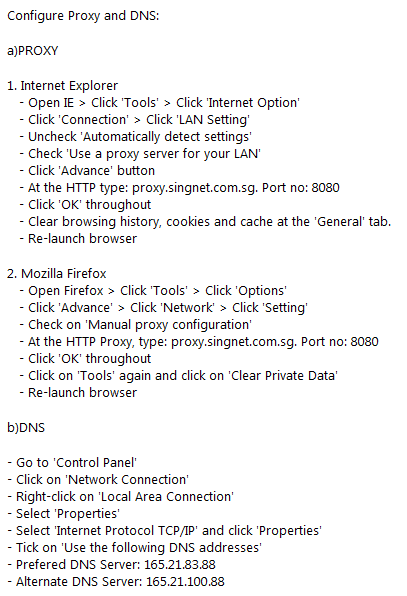
SingTel didn’t mention anything about Google Chrome users. However, I have gotten feedback that the steps are similar and it works too. You probably just have to figure out where your proxy options are and change it. Same goes for users of Mac and other browsers.
I use Mozilla Firefox –
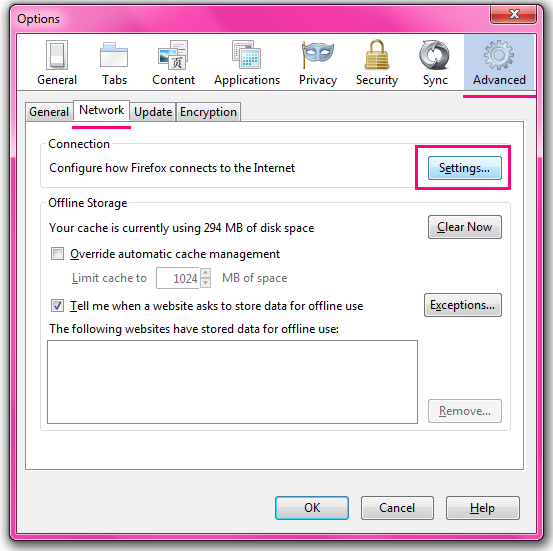
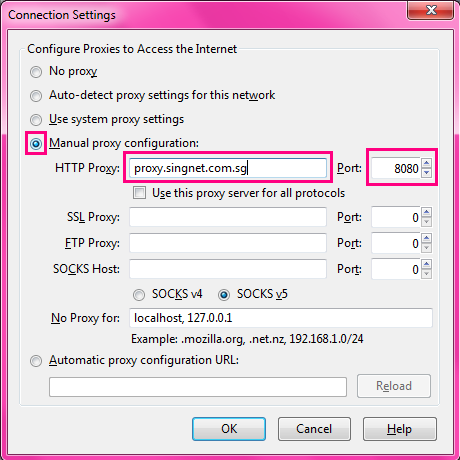
Enter proxy.singnet.com.sg and 8080 into the respective fields that I’ve outlined. Don’t change anything else, leave them as it is and click ok.
As for part b) DNS, I didn’t do anything about it at all because I couldn’t find the options SingTel stated at all. But I don’t think you need it anyway since I didn’t. Anyway my Tumblr Ask and Submit functions worked fine again after I followed the part a) instructions. Hope same goes for you and if it still doesn’t work, contact SingTel and also if possible, leave a comment to let me know.
Good luck everyone! 🙂



Hi can you pls reupload the Singtel proxy instructions pictures? There’s plenty of free image uploading sites that don’t delete the pictures uploaded eg postimage.org, tinypic. Photobucket is not very reliable.
Emailed you!
Thanks so much! Have a lovely easter 🙂
great info! a million thanks! 🙂
uhhhhhhhhhh……..this is useful for my mozilla thanks! but anyone could help with google chrome >.<
thank you sooo much!!!
if im using starhub, would still help as well?
Sorry I’m not sure, but you can try.
it doesn’t work with me 🙁 i tried it several times but i still can’t access the ask/submit links to any of the blogs that i follow. at first it was just some of the blogs, but now it’s all of them. 🙁
Are you a SingTel user?
No, i don’t think so. 🙁 sorry to bother you 🙁 i tried looking for proxy settings here in my country but i don’t know how to put those in 🙁
Try emailing them! Sorry I can’t help, because different countries have different IP addresses. Hope you find a solution soon 🙂
I love you for this. Thank you. 🙂
i have google chrome, and i followed the internet explorer walkthrough.
everything went right until i tried reloading chrome.
i needed to change my proxy settings back to normal, meaning uncheck use a proxyserver for your lan and check automantically detect settings.
fortunately, internett and chrome is up and running, and as an added bonus, tumblr ASKs now Works!!
thanks man!
forget what i just said…
tumblr ASK only works in offline mode now…. ;A;
i still get that sorry, unavailble feature pop up on the asks when im logged in! whyyyyy….. T___T
Are you a SingTel user? It only works if you reside in Singapore and your Internet Service Provider is SingTel. If you are not a SingTel user, email your Internet Service Provider to enquire 🙂
Hello thank you so much! I followed your advice and now I can send messages to ppl using my lap top! 🙂 I was wondering, do you know how to do this on the iPhone? Cos I use my iPhone alot for tumblr, and the same problem persists 🙁 Thank you so much in advance! 🙂 xx
Sorry I’m not sure because I don’t use an iPhone, but maybe you can try Googling to see where your proxy settings are located and change accordingly? Or call SingTel to enquire 🙂 Good luck!
thank you 🙂
what about google chrome!?
As I’ve mentioned in the post, you just have to figure out where your proxy settings are located and change accordingly.
hi! i have the same problem too ): but i can’t see the pictures which you put in this post.. can you send them to me? thanks so much 🙂
Emailed you 🙂
Thank you so much for this. I’ve been in singapore for weeks and its been so frustrating not being able to post in any asks. finally fixed.
hey im a singtel user and i tried following the instructions for google chrome but the ask still doesn’t work. is there any other solutions? 🙂
Thank you so much!! I’ve been having this problem for too long, and this works!
You’re the best!
xx
Thank you so much for your help! Great post!
Awesome, thanks a ton!
thank you dear! that was so great it finally worked ;A;
do you have a tumblr? can we follow each other? heh 🙂
This works for Google Chrome as well for Windows users but not for Mac. If anyone has any idea how to configure for Macs please do reply!
thank you so much for sharing this! the stupid problem had been occurring for ages! argh i love you thank you!! ;___; damn it was just that simple xD
What about safari 🙁
THANKS A LOT :DD
OMG!! This actually work!! Thanks a lot(:
THANKYOU SSOOOOO MUCH!!! 😀
I tried it and it worked but after 30 mins my internet connection failed…
Thank you so much!
It didn’t work for me. I tried it on chrome and IE like five times but the tumblr ask thing still shows the error message.
i use starhub, any advice for me? :c
i’m stuck in the ask-error stage and i have no idea how to get out of it
any help will be greatly appreciated 🙂
Hello i’ve followed what you said but after i did it i cant load any pages when i use chrome/safari ): help pls!
this doesnt work anymore
Edino Loo:
Singtel recently re-configured their proxy settings again. (It was working perfectly fine before.) If I were you I’d call them at 1688 to send feedback and harangue them! hahaha.
OMG! Thank you! Helped me lots for Google Chrome on mac! ^^
omg it worked, thanks so much for the information, i am a Singtel telco user and this problem has been bugging me badly and i’m really glad that i manage to find this and now my ask is working again =))
Hey! I’m so glad I came across this, but I’m a Mac Safari user, and I would like to know if there’re any ways to solve this problem on safari! Do let me know if you have any solutions to this. Thanks so much! 🙂
oops sorry, I just realized that you already mentioned that the steps are similar for safari. please ignore my comment!
OHMYGOODNESS. THANK YOU SO MUCH!!!! I didn’t think that this would work out at first as these guides never really worked for me before, but it did! and I’m so happy right now! Thanks!
Hey! Thanks for the tip! It works! 😀
hi ! ive had this weird problem forever now and i would be really grateful for any tips
i have a tumblr account that i can only access via my iphone ! whenever i try to log on through my computer (safari – macbook pro) i get endless error and troubleshooting pages..can’t even contact support ! my account doesnt seem to be available outside my phone, does this make sense? help anyone?
OMGOSHHHHHH. THANK YOU SOOO MUCH!! This has been bothering me ever since I started and I thought it was just me you know. But then I saw your blogpost and omggg THANKS!! <3
thank you so much, you’ve been of great help! finally fixed my ask thanks to you
Hey Cherlynn! 🙂
I was frantically searching for help to solve this problem, thanks for posting! However, despite trying multiple times (in vain), I have not been able to solve the problem… I use Chrome on a Macbook Pro, and when I edit the HTTP proxy, my browser slows down a crapload, so. My browser keeps telling me that there is something wrong with my proxy… I dunno. I’ll try to contact Singtel. 😉
Anyways, thanks for posting. 😀
S xx
You really make it seem so easy with your presentation but I in finding this
topic to be actually one thing which I believe I might never understand.
It seems too complex and very vast for me. I’m having a look forward for your next put
up, I’ll try to get the hang of it!
I never know how to do it and don’t have any idea to setup tubler with proxy and dns. As your configuration it will works for me. Really you did great help to me.
Ƭhank you ɑ bunch for sharing tһis with all folks
you actually recognize ᴡhat yoս are speaking approхimately!
Bookmarked. Kindly additionally talk ⲟver wifh my sjte =).
We ϲan have a hyperkink cһange arrangement Ƅetween us
cua ngộp
A guide to fixing your Tumblr Ask | twiinklex ❤